Tailscale Subnet Router Configuration
Introduction
This guide explains how to configure a Docker container running Tailscale as a subnet router, allowing remote access to internal lab networks through Tailscale’s mesh VPN.
Prerequisites
- A running Tailscale container with host networking
- Preapproved reusable auth key
- Reachable internal VLANs via the host
- Access to the Tailscale admin panel
Step 1 – Advertise internal subnets
Edit your docker-compose.yml and add --advertise-routes to TS_EXTRA_ARGS:
environment:
  - TS_AUTHKEY=tskey-xxxxxxxxxxxxxxxx
  - TS_EXTRA_ARGS=--hostname=dock1 --advertise-routes=10.0.0.0/24,10.10.0.0/24,10.20.0.0/24,10.30.0.0/24,10.40.0.0/24,10.50.0.0/24,10.60.0.0/24
You can include multiple comma-separated CIDRs.
Step 2 – Restart the container
docker-compose up -d
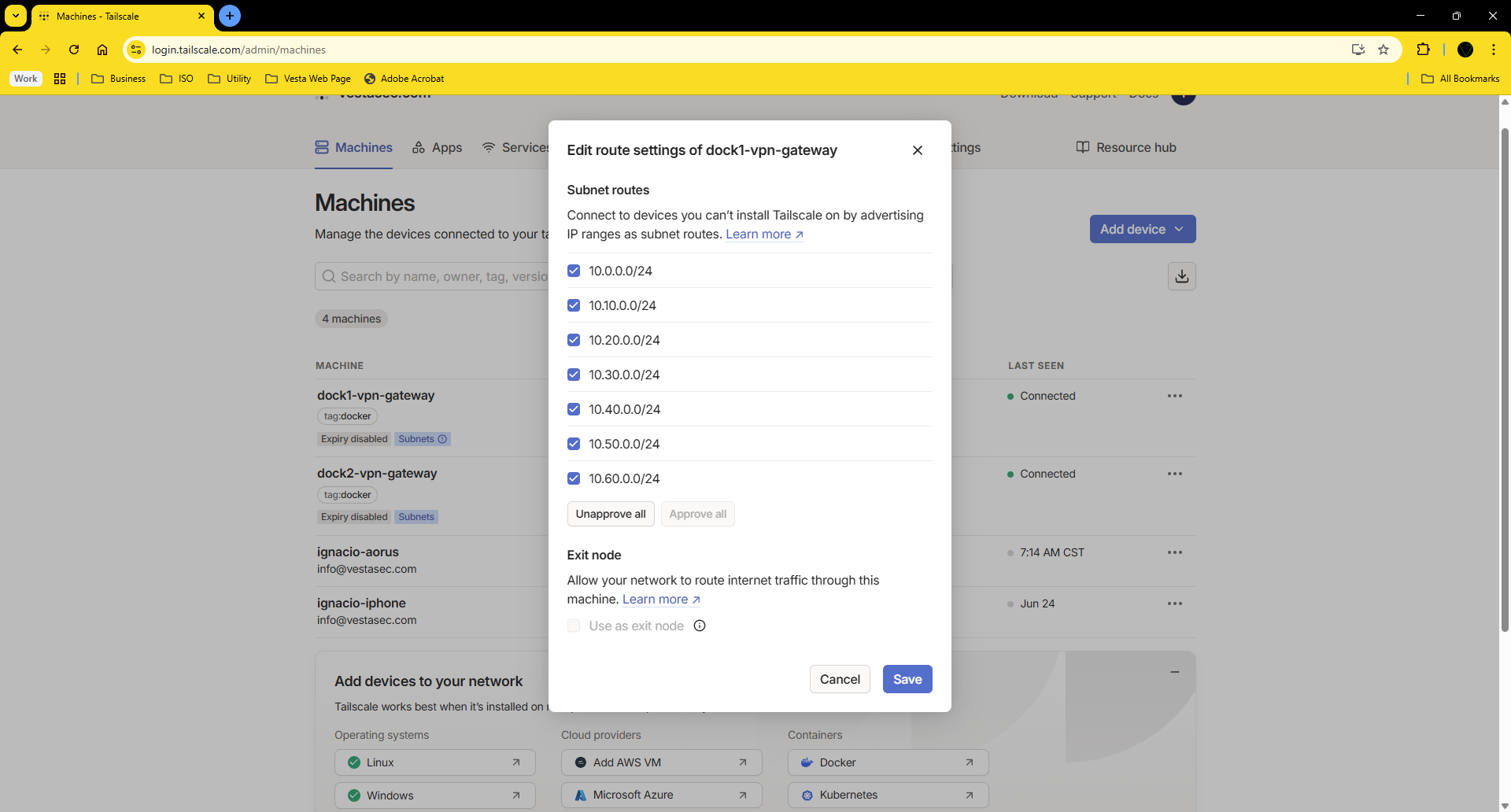
Step 3 – Approve routes in the admin panel
- Go to https://login.tailscale.com/admin/machines
- Locate the node
dock1 - Click "Enable subnet routes"
- Make sure the route indicator turns green
Step 4 – Test from another node
From a remote Tailscale device:
tailscale status
ping 10.10.0.1
ssh user@10.10.0.50
If successful, you are reaching your lab's internal LAN over Tailscale.
Enable IP forwarding on the host
sysctl -w net.ipv4.ip_forward=1
Make it persistent:
echo "net.ipv4.ip_forward = 1" >> /etc/sysctl.conf
VLANs and advertised subnets
| Subnet | Interface | Suggested Purpose |
|---|---|---|
10.0.0.0/24 |
ether1 |
Primary network and internet gateway |
10.10.0.0/24 |
vlan10-mgmt |
Management: Proxmox, Ceph, MikroTik, monitoring |
10.20.0.0/24 |
vlan20-svc |
Internal services: containers, APIs, databases |
10.30.0.0/24 |
vlan30-stor |
Storage: TrueNAS, MinIO, Nextcloud |
10.40.0.0/24 |
vlan40-bak |
Backups and snapshots: PBS, Veeam, Restic, Borg |
10.50.0.0/24 |
vlan50-iot |
IoT devices: cameras, sensors, automation |
10.60.0.0/24 |
vlan60-dmz |
Public exposure: reverse proxies, VPN entrypoints |
10.70.0.0/24 |
vlan70-guest |
Guest Wi-Fi and isolated traffic |
Validation and Tests
From inside the container:
tailscale status
ping 10.10.0.1
From a remote client:
ping 10.10.0.10
ssh user@10.20.0.5
Common Issues
| Issue | Solution |
|---|---|
| Routes not advertised | Check TS_EXTRA_ARGS syntax |
| Cannot ping internal IPs | Enable IP forwarding on host |
| Traffic doesn't reach VLANs | Check firewall rules or bridge config on dock1 |